
Project documentation
Project overview.
Requirements, structure, wireframes, style guide and ethics for the Alaradi Dental website project.
01Project overview
- Website title
- Alaradi Dental & Cosmetic Center (redesign concept)
- Category
- Commercial website
- Problem statement
- The clinic’s current website is a generic booking template: it shows no phone number, email or opening hours on the home page, lists services only as category names, and its colours don’t match the clinic’s navy and gold logo. Patients have to rely on Instagram for basic information.
- Target audience
- Adults and families in Bahrain, especially around Salmabad, looking for general, cosmetic, orthodontic, implant or children’s dental care, and existing patients checking hours, doctors or insurance.
- Objectives
- Present accurate clinic information clearly; make contact and booking easy on any device; explain each treatment in plain language; show the real clinic, doctors and results; demonstrate a simple booking flow; meet the IT6012 requirements.
- Team
- Yousif Alaali, 202501330
Mohammed Ali, 202404221
Adam Ali, 202405967
Yousif Alhamad, 202500649
02Requirement analysis
Functional requirements
- User registration form on the Home page (first and last name at least 3 characters, mobile exactly 8 digits, valid email) with success and error messages.
- Navigation between all seven pages from every page, including a mobile menu.
- Demo patient portal: log in, sign up, dashboard, booking in five steps, receipt and appointment status with days remaining.
- Interactive before/after slider and case switcher.
- Services photo preview and a section bar that follows the page.
- Live “open now” indicator based on the clinic’s hours in Bahrain time.
- One-tap call, WhatsApp, email and directions links.
- Arabic and English versions and light and dark themes, each remembered between visits.
Non-functional requirements
- Performance: WebP images in several sizes, lazy loading below the fold, no frameworks, video loads only on request.
- Accessibility: WCAG AA contrast, labelled form fields, keyboard support, focus rings, alt text, reduced-motion support.
- Security & privacy: no data is sent to any server; visitor input is escaped before display; demo data stays in the browser tab.
- Usability: contact options on every page, plain-language copy, clear error messages.
- Responsiveness: fluid layout from 320px to 2560px wide.
03Site map
04User journey map
A new patient’s route from arriving on the site to leaving with a booking.
- Arrive
Lands on Home and sees the clinic, whether it is open now, and how to call.
- Explore
Reads the treatments on Services and checks the doctors and published results.
- Register
Fills in the registration form; mistakes are explained next to each field.
- Sign up
Continues into the portal with the details pre-filled and sets a password.
- Book
Chooses a treatment, doctor, date and time, then reviews and confirms.
- Leave
Keeps the receipt reference, checks the countdown, and uses Visit us for directions.
A returning patient’s route through the demo portal.
- Return
Opens any page and presses Book appointment.
- Log in
Enters an email and password; a wrong password is explained clearly.
- Choose
Picks a treatment, a doctor, a date and a free time.
- Confirm
Reviews the details, changes any step, and confirms.
- Receipt
Gets a demo receipt with a reference number that can be printed.
- Status
Sees the appointment with the days remaining, can cancel it, and logs out.
05Low-fidelity wireframes
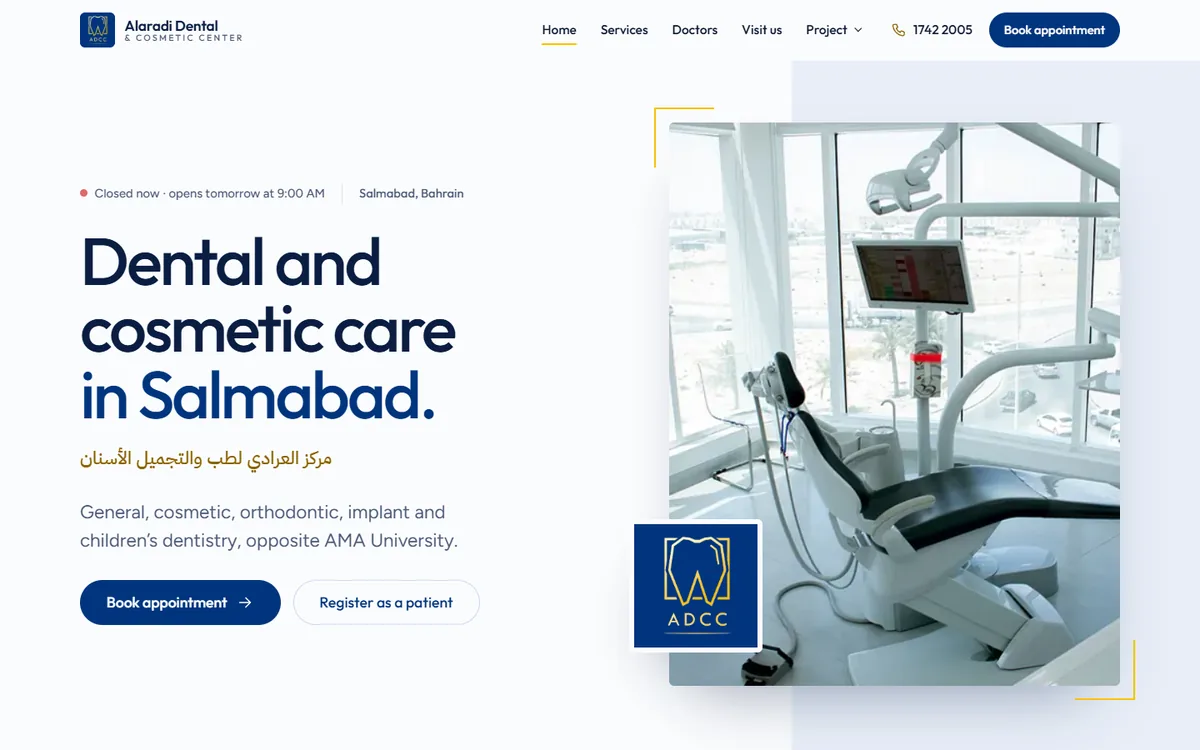
Desktop wireframes for all seven pages. Each collapses to a single column on phones.
1. Homehome.html 2. Services & treatmentssubtopic1.html 3. Doctors & smile gallerysubtopic2.html 4. Visit ussubtopic3.html 5. Planning & designplanning-design.html 6. Reflection & AI reportreflection-ai-report.html 7. Project overviewoverview.html
06High-fidelity mockups
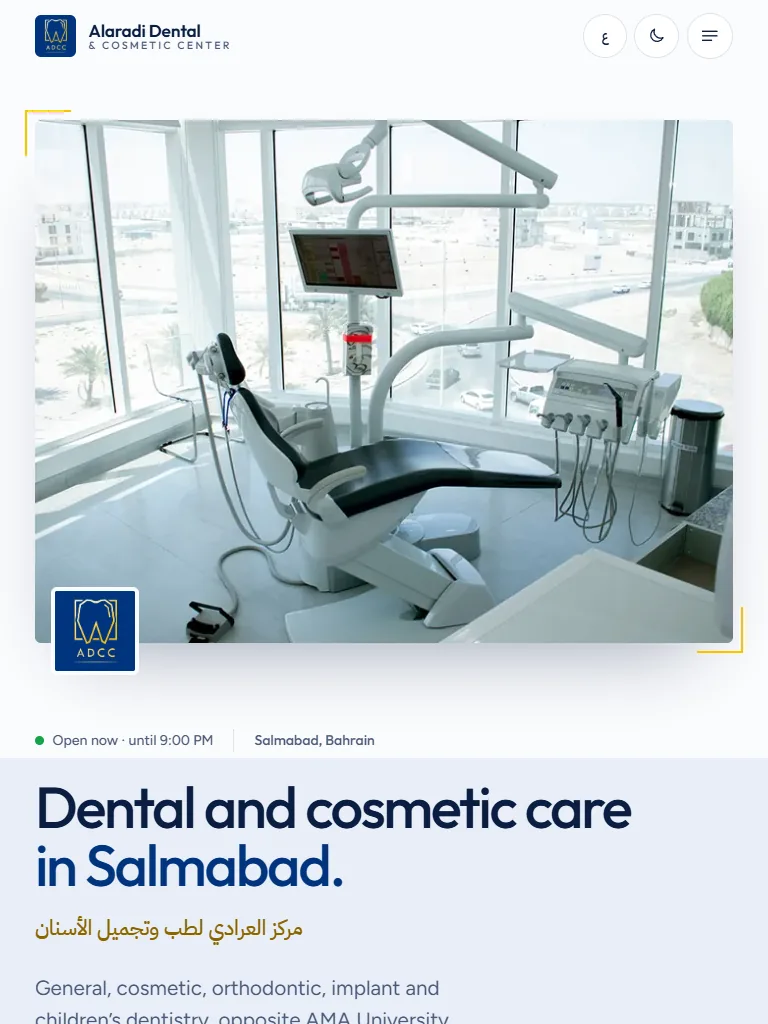
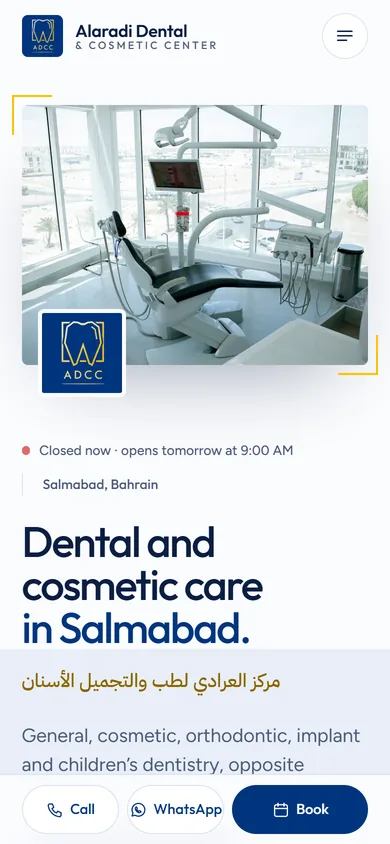
Screenshots of the finished pages, captured from the site itself.
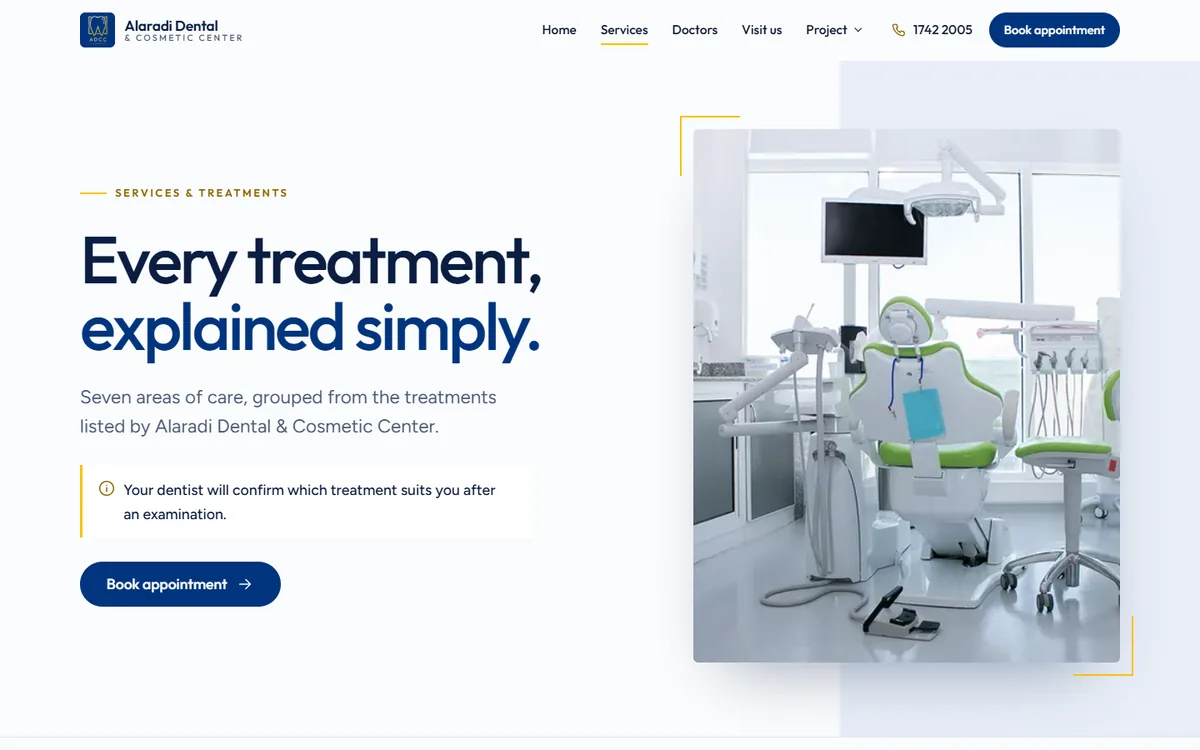
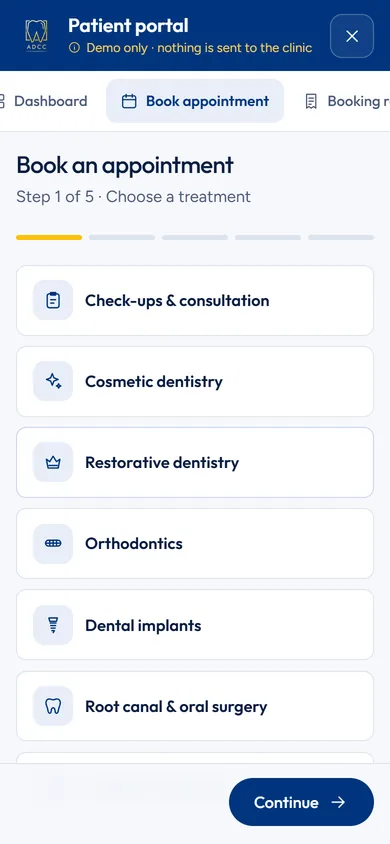
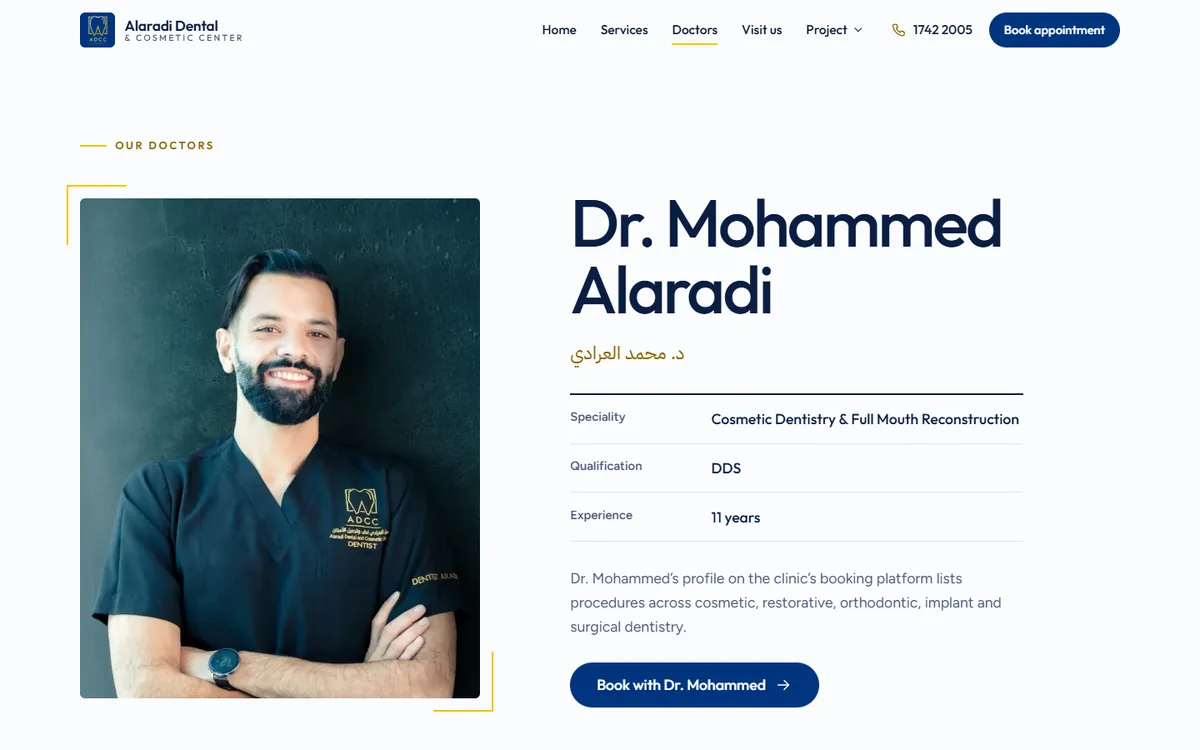
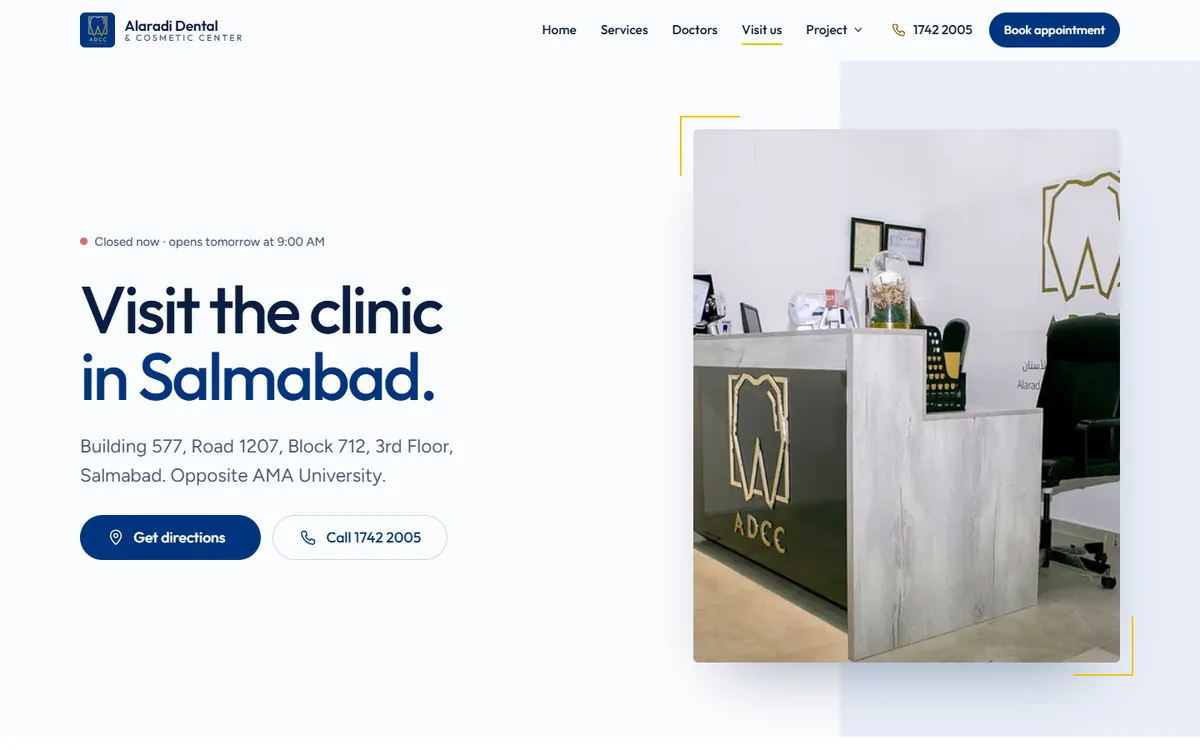
07UI style guide
Colour palette
- PrimaryNavy
#01357E - SecondaryMidnight
#0A1E42 - AccentGold
#FAC007 - NeutralPorcelain & Slate
#FBFCFE · #4A5A78
Typography
- Heading font
- Outfit, weight 500
- Body font
- Figtree, weight 400, line height 1.65
- Arabic headings
- Alexandria · مركز العرادي
- Arabic body
- IBM Plex Sans Arabic · مركز العرادي
Dark mode
The dark theme keeps the same navy and gold and remaps the surface and text colours. Contrast was checked in both themes.
- BackgroundNight navy
#0B1526 - SurfaceDeep navy
#111F38 - TextSoft white
#F1F5FB - LinksLight blue
#A9C5F5
Buttons
Cards
Doctors use borderless portrait “cards”: a 4:5 photo, a rule that turns gold on hover, then name, Arabic name and role.
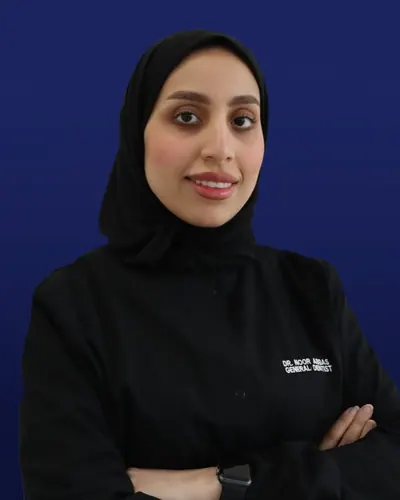
Dr. Noor Abbas
General Dentist
Navigation bar
Sticky header with the logo tile, five links with a gold underline for the current page, the phone number on wide screens, a navy “Book appointment” button, and language and light/dark buttons. On phones, a full-screen menu and a bottom action bar.
Forms
First name must be at least 3 characters.
08Responsive design plan
Layouts are fluid rather than fixed. Font sizes and spacing use rem with clamp(), breakpoints use em, and containers use percentages with a maximum width, so the three layouts below flow into one another.
| Device | Width | Layout |
|---|---|---|
| Mobile | 320 to 767px | Single column; photo above the headline; full-screen menu; bottom action bar (Call, WhatsApp, Book); doctors swipe sideways; portal fills the screen. |
| Tablet | 768 to 991px | Two-column information and form rows; photos still above text in heroes; mobile menu. |
| Desktop | 992px and wider | Full navigation bar; asymmetric two-column sections; sticky treatment titles and contents lists; container capped at 78rem so lines stay readable on large screens. |
09AI utilisation plan
AI is used only in the development process; the website itself has no AI features. The brief requires at least three AI tools.
| AI tool | Purpose of usage | Expected outcome |
|---|---|---|
| Figma (HTML to Figma community file) | Design and prototyping stage: exploring and visualising how the pages could look. | A visual direction the team could discuss and agree on before the build. |
| ChatGPT (OpenAI) | Discussing design requirements and ideas, and refining the prompts and instructions given to Claude Code. | Clear, complete instructions that produce the result the team intended. |
| Claude Code (Anthropic) | Research and planning, requirement analysis, UI and UX design, HTML, CSS and JavaScript, Arabic translation, automated testing and debugging. | A complete, tested seven-page website that follows the brief and uses only verified clinic information. |
| rembg with the BiRefNet portrait model (open source, runs on our computer) | Image preparation: removing the backgrounds of the four doctor photos. | Four consistent portraits with the people unchanged, and no photo uploaded to an outside service. |
Workflow: design exploration in Figma, ideas and prompt wording with ChatGPT, implementation with Claude Code, image preparation with rembg, then testing and refinement.
10AI documentation
Prompts are quoted from our saved chat history; long prompts are shortened to their key sentence.
| AI tool | Purpose | Prompt used | Output generated | Modifications made |
|---|---|---|---|---|
| Figma (HTML to Figma community file) | Design exploration and prototyping | No text prompt: this was visual design work in the Figma file listed in the references. | Visual layouts of the pages for the team to review. | The team discussed the layouts and carried the agreed ideas into the written instructions. The design was refined further during the build. |
| ChatGPT (OpenAI) | Refining prompts and instructions | Exact wording not saved. In summary: we described our design requirements and ideas and asked for a clear, structured instruction for Claude Code. | Structured prompts, such as the instructions quoted in the rows below. | We read each prompt, checked it against the brief and our own decisions, and adjusted it before using it. |
| ChatGPT (OpenAI) | Checking progress against the brief | Now does every point in the project is successfully agreed with the project requirements what does claude mean by the final QA result | A point-by-point comparison of the project with the requirements, and a plain-language explanation of the final testing step. | Used as a second opinion only. The checks themselves were run on the website, and we confirmed the remaining details, such as the submission date, ourselves. |
| Claude Code (Anthropic) | Planning and requirement analysis | Do NOT start building the website yet. First, carefully read the instructor's Markdown document and understand exactly what the assignment requires. | A planning report: a checklist of the brief, a proposed seven-page structure, facts collected from the clinic’s website, Google Maps and Instagram, and eight questions for us. | We approved the structure, chose the Google Maps opening hours after the sources disagreed, removed the consultation price, and decided not to use Bootstrap. |
| Claude Code (Anthropic) | Home page, shared styles and the registration form | Planning is approved. You can start coding now. | A first Home page with the registration form, its validation rules, and the shared CSS and JavaScript. | We rejected the first design as too basic and asked for a redesign. The second version kept the features and changed the layout, photography and shapes. |
| Claude Code (Anthropic) | Remaining pages and the booking demonstration | Home page is approved. Continue implementing the rest of the project now. | The Services, Doctors and Visit us pages, the three documentation pages, and the demo patient portal. | We supplied the second member’s ID, replaced the map placeholder with the clinic’s Google Maps listing, and kept the booking demonstration simple. |
| Claude Code (Anthropic) | Testing and debugging | Do the final polish and bug-fixing pass across the entire project before deployment. | An automated test script covering seven pages at eleven screen widths, and a list of bugs with fixes. | Fixes kept after review: the mobile menu was trapped inside the header, hidden elements were still showing, photo reveals did not start, and doctor cards were hidden on phones. |
| Claude Code (Anthropic) | Arabic version, right-to-left layout and dark mode | I now want you to make the following final enhancements, fully test everything, and then update the existing Cloudflare deployment. | An Arabic dictionary of about 800 phrases, right-to-left styles, a dark theme, and two header buttons. | Corrected after testing: phone numbers appeared reversed in Arabic, colour codes displayed wrongly, one label was unreadable in dark mode, and the booking demo crashed at the time step. |
| rembg with the BiRefNet portrait model (open source, runs on our computer) | Image preparation: doctor portraits | No text prompt: the model receives a photo and returns the person without the background. Our instruction for this task was: Keep each doctor's real identity, face and appearance completely intact. | Cut-outs of the four doctors from their original photos. | The first model removed one doctor’s white coat, so a portrait model was used for all four. The cut-outs were placed on a blurred photo of the clinic’s own treatment room. Faces and bodies were not changed. |
| Claude Code (Anthropic) | Project documentation and the reflection draft | Use only information supported by the actual project history. | A compliance check against the brief, these AI tables, the reference list, and a draft of reflection sections 1 to 3. | Limited to facts in the project record. The team supplied the member details and the points for the collaboration section. |
Evaluation of AI output
- Strengths: consistent, readable code produced quickly; thorough automated testing; careful handling of the clinic’s real information when given clear rules.
- Weaknesses: the first design was generic; one code change broke the booking demo until a test caught it; the first background-removal model damaged a photo; and the AI could not tell which opening hours were correct without us.
- Figma and ChatGPT helped us agree ideas and wording, but neither produced the website itself; the code came from Claude Code and was tested separately.
Improvements made
Each output was reviewed before the next stage. The main improvements were the redesign of the Home page, the corrected opening hours, the bug fixes listed in the table, and the portrait model change. Nothing was published before the automated tests passed.
Ethical considerations
- AI was not allowed to invent clinic facts, prices, qualifications, testimonials or medical claims.
- Doctor photos were processed on our own computer and the people were not altered or generated.
- The website has no AI features, so no visitor receives AI advice about their health.
- All AI assistance is documented on this page, and the team remains responsible for the final content.
11Ethical & legal best practices
- Permission
- The clinic’s owner gave the team permission to use the clinic’s name, logo, photographs and published material for this university project.
- Honest presentation
- The site states in the footer and project section that it is a university redesign concept, not the clinic’s official website.
- Accurate information
- Every fact comes from the clinic’s website, Google Maps listing or Instagram, or was confirmed by the owner. No doctors’ qualifications, prices, treatments, testimonials or medical claims were invented. Service descriptions are general and avoid promising results.
- Image credits
- Clinic photographs, before/after cases and doctor portraits: Alaradi Dental & Cosmetic Center (alaradidental.com and @alaradidental on Instagram), used with permission. Portrait backgrounds are made from the clinic’s own treatment-room photo. Video: Medical BH on YouTube, embedded rather than copied. Insurer names are shown as text, not logos.
- Patient privacy
- Before/after images are the clinic’s own published cases; no patients are named or described beyond the treatment shown.
- Visitor data
- The registration form and patient portal are demonstrations. Nothing is sent to the clinic or any server; demo data is kept only in the browser tab and cleared when it closes; passwords are never stored in plain text.
- Fonts & code
- Outfit, Figtree, Alexandria and IBM Plex Sans Arabic are licensed under the SIL Open Font License. The code was written for this project with documented AI assistance; no templates or frameworks were copied.
- AI use
- AI tools used during development are documented above, as the brief requires.
- Accessibility
- Designed to WCAG 2.1 AA: contrast, labels, keyboard access, alt text and reduced motion.
References and credits
External sources used for this project, accessed in September 2026.
- Alaradi Dental and Cosmetic Center, official website: services, doctors, insurance partners, clinic and case photographs. alaradidental.com
- Alaradi Dental on Instagram: phone numbers and the doctor announcement images. instagram.com/alaradidental
- Google Maps listing: address, opening hours and the embedded map. maps.app.goo.gl/cozHt7YDKBZFDSiJ7
- Medical BH on YouTube: the embedded video with Dr. Mohammed Alaradi. youtube.com/watch?v=NVXLgHNCrBY
- Google Fonts: Outfit, Figtree, Alexandria and IBM Plex Sans Arabic. fonts.google.com
- W3C Web Content Accessibility Guidelines (WCAG) 2.1: contrast and accessibility criteria. w3.org/TR/WCAG21
- Figma: the HTML to Figma community file used at the design stage. figma.com/design/S1Xqdj0EOatcUjyNqZg50Q
- Tools: Figma, ChatGPT, Claude Code and rembg (documented above), Playwright for testing, Pillow for image optimisation, Cloudflare Pages for hosting.